Kal, our support agent in SupportWire, could hold a conversation. It could read a thread, understand what a customer wanted, write a good reply. What it couldn't do was act.
A customer would say "Send me all invoices for the year," and the best Kal could manage was a polite "I've flagged this for the team." Which isn't the best thing to read from an agentic live chat app — especially when the whole product is built around sub-second first tokens.
So we set out to give Kal hands. The catch is that "let the AI call an API" is one of those features that sounds like an afternoon and turns into a month, because the moment you let a language model make outbound HTTP calls with real credentials, you've signed up for a security problem and a UX problem at the same time. Almost every hard part turned out to be the same question wearing a different costume. We started to look at these problems as templates that needed to be filled in. The question then becomes who gets to fill in each blank.
Two kinds of connectors
Not every integration is the same shape, so we didn't force them into one.
Internal connectors are the ones we write. They run on our own server, on top of integrations we already trust — like creating a ticket in an issue tracker or a record in a system we control. The code is ours, the auth is ours, and the model only gets to fill in a few blanks.
External connectors are the interesting ones. A customer opens the dashboard and describes an HTTP endpoint: a URL, a method, some headers, a body. That becomes a tool Kal can call. We don't know the endpoint ahead of time and we can't review the code, because there isn't any. It's data. This is the part we don't control, and it's where all the hard parts live.
The rest of this post is mostly about the external ones.
A request is a template with holes
Once you stare at enough of these, a connector operation stops looking like an API call and starts looking like a form with blanks in it:
PUT {base}/projects/{{param.id}}
API-KEY: {{secret.apikey}}
Authorization: Bearer {{secret.jwt}}
body: { "name": {{param.name}} }
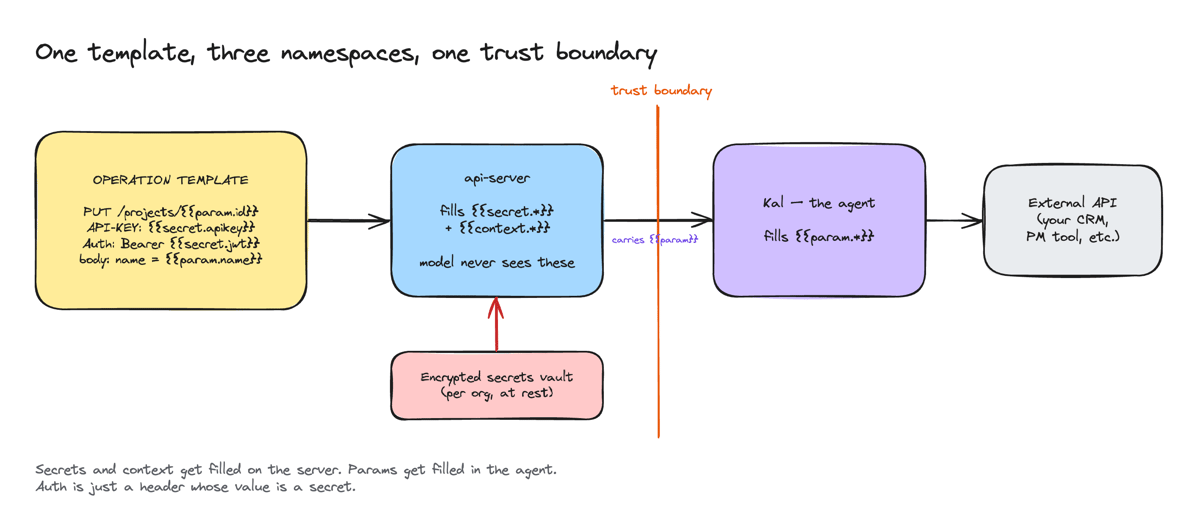
The blanks are not all the same. {{secret.apikey}} is an API key that must never touch the model. {{param.id}} is the project id, but the whole point is that the model chooses it. If you fill both in the same place you've already lost: fill them on the server and the model can't pick anything, fill them in the agent and you've handed it your keys.
Who gets to fill each blank
We split the blanks into three namespaces and drew a line down the middle of the system.
{{secret.*}}— secrets, filled on the server from an encrypted per-org vault. They get baked into the request before it crosses to the agent, but the model never sees them. Kal never receives a secret as a tool argument or in its context.{{context.*}}— who this conversation is about (customer email, conversation id, org). Also filled on the server.{{param.*}}— the model's arguments. Filled in the agent, at call time.
The server does its pass first, swapping in secrets and context. Whatever's left still has {{param.*}} in it, and that partially-filled request is what crosses to the agent. Kal fills the rest.
The nice thing about splitting it this way is what it does to auth. The approach we lean on isn't a bespoke scheme system. Auth is just a header whose value happens to be a secret. Bearer token? Authorization: Bearer {{secret.token}}. API key? API-KEY: {{secret.apikey}}. The dual-auth case that usually needs special handling, where an API wants both a key header and a bearer token, is just two headers. Nothing special, because the secret substitution doesn't care what header it's filling. (There's an older auth_type path in the code for bearer, basic, and api-key schemes. Named secrets are the reason we never had to keep growing it.)
How Kal actually calls one
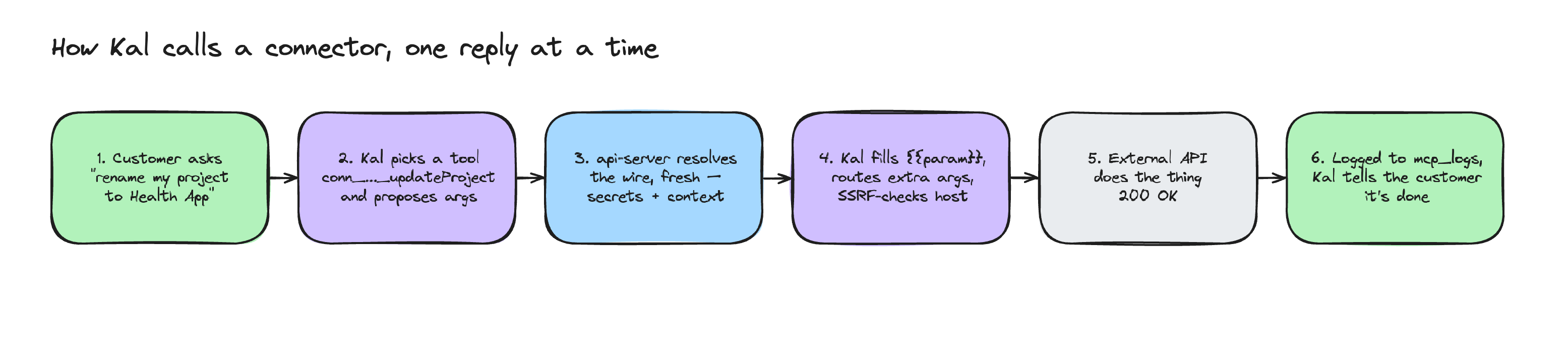
Every operation a procedure binds becomes a tool, named conn_<connectorId>_<op> (the id sanitized down to a valid tool-name slug). Kal sees it in its toolset like any other tool, with a JSON schema describing the inputs. The model decides to call it and proposes arguments.
Then the routing happens. The model doesn't have to know that id goes in the URL and name goes in the body. It just provides values, and the engine figures out where each one lands:
- If a value's name matches a
{placeholder}in the path, it goes in the path. - If it's referenced by
{{param.x}}in a header or the query, it goes there. - If it's not referenced anywhere, it auto-merges: into the JSON body for writes, into the query string for reads.
So the model says { id: "18281", name: "Health App" } and the engine turns that into PUT /projects/18281 with {"name": "Health App"} as the body, without the model ever thinking about HTTP mechanics.
The wire gets resolved fresh on every reply. Edit a connector, and the next message Kal sends already uses the new version. No cache to bust, no restart. And every call lands in an mcp_logs table, so there's a record of exactly what Kal did on a customer's behalf.
The UX problem nobody warns you about
The engine was clean. The editor was a disaster. It took a customer poking at it to make me see why.
They had defined an operation, added a parameter called name, and asked me, genuinely confused:
"I added it in the parameters section, should I also put it in the body JSON?"
And they were right to be confused.
The editor showed a flat list of parameters and, separately, a raw JSON body box, and gave no hint about how the two related. The honest answer to their question was "it depends on the method and on whether you referenced it anywhere," which is a terrible thing to make a non-developer reason about.
The deeper issue: most people defining an API don't know the difference between a path parameter, a query parameter, and a body field. And a raw "body JSON" textarea reads like a trap. Why would you type JSON by hand into a support tool?
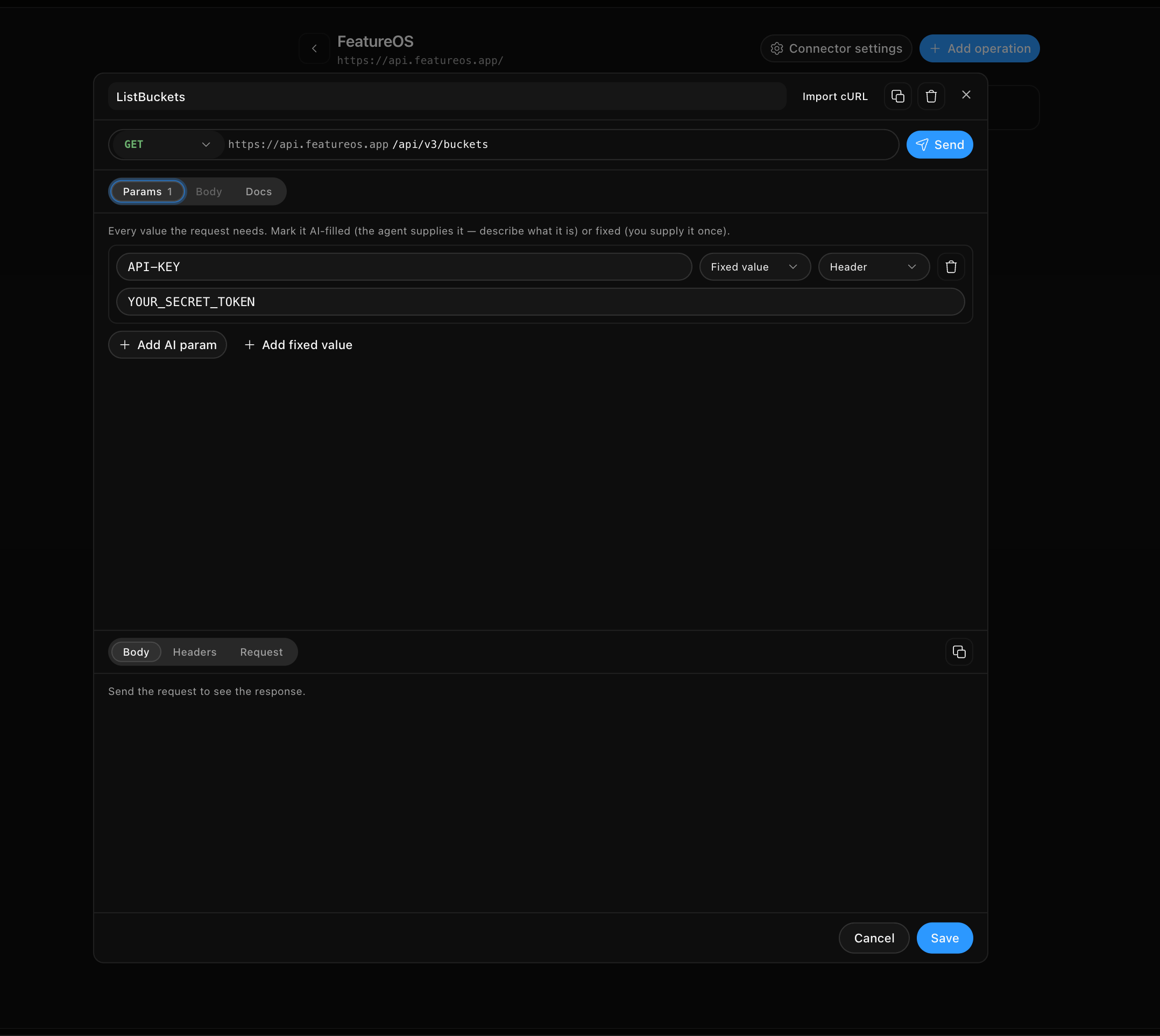
We rebuilt the editor around one idea: don't make people classify anything. You add inputs. Each input shows, in plain English, where its value goes (In URL, In data, Query, Header), inferred from the request rather than chosen from a menu. A live preview renders the exact request that will be sent, with secrets masked as dots, so you can see the shape of it before you ever hit test. And you can paste a curl command to fill the whole thing in at once, which is usually how the request already exists anyway — a line someone copied out of the API docs.
The lesson I keep relearning: a correct engine and a usable interface are two different projects. Finishing the first one feels like the work is done. It isn't.
A bug worth keeping
One more, because it's a good one.
A customer was testing an operation and the preview showed their headers as API-KEY: {} and Authorization: Bearer {}. They reasonably concluded the headers weren't being sent at all.
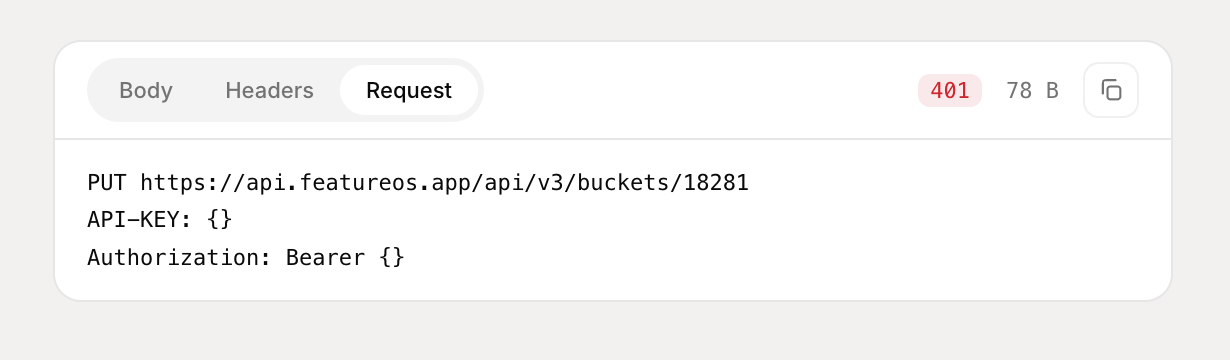
They were being sent fine. The {} was a rendering bug in the echo, the redacted copy of the request we show back. The path-parameter fill uses a single-brace shorthand, {id}, with a regex that matched the inner {secret.apikey} of {{secret.apikey}} and collapsed it to {}. The real request had the real secret; only the preview lied. A negative lookaround in the regex fixed it, so a {key} inside a {{...}} is left alone.
I like this bug because it's the whole thing in miniature. The choice that makes the design safe — a secret that never renders — is the exact choice that made this so confusing to debug.
What I'd tell you if you're building this
Draw the trust boundary first. Before the editor, before the schema builder, before any of it, decide which side of the line fills each blank.
Every good decision we made fell out of that one line, and most of the bugs came from moments where the line got blurry. The three namespaces, the "auth is just a header" trick, the server-resolves-then-agent-fills flow, even the SSRF check: they're all just consequences of taking the boundary seriously.
Kal can fetch all your invoices now. Quietly, in one request, while it's still typing the reply that says it's done — the same live-chat latency budget we obsess over in the R&E Group.