
OpenFault for iOS is out on the App Store, and it's free. It connects to your self-hosted OpenFault server. You pair it by scanning a QR code, get push alerts for new issues, regressions and spikes, and can resolve or mute an issue straight from the notification. Widgets put your unresolved count and the latest issue on your home and lock screen.
When we introduced OpenFault last month, we said an iOS app was next. This is it.
What OpenFault is
OpenFault is an error tracker we built at Skcript. You run it yourself, in one container with SQLite. The official Sentry SDKs work with it unchanged, and you only change the DSN. It has an MCP server built in, so coding agents like Claude Code and Cursor can read and triage issues through the same handlers the web UI uses. It's open source under the MIT licence, and the code is on GitHub.
One honest note before the rest. The OpenFault server is in active development and is not production ready. We run it at Skcript, and details may still change.
What the app does
The app is a native SwiftUI client for your server. It has:
- A dashboard across all your projects, with unresolved, new, regressed and event counts for 24 hours, 7 days or 30 days.
- An issue list that takes the same search syntax as the server.
- Issue detail with the stack, breadcrumbs, request, tags and activity.
- Triage actions: resolve, mute, approve and assign.
- Releases and notification preferences.
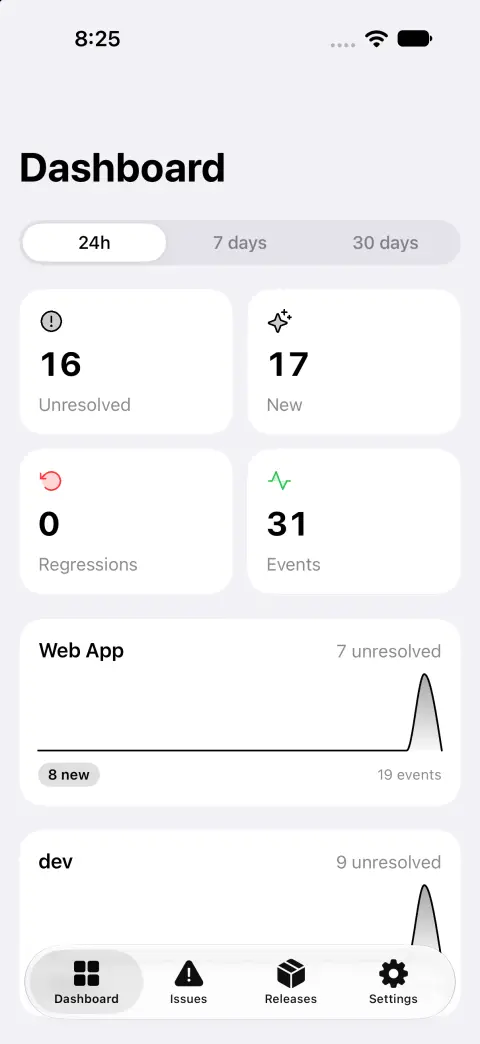
While the app is open, the dashboard and issue list refresh every 15 seconds.
Push you can act on
Push covers new issues, regressions and spikes. Tap a notification and the app opens that issue. The notification also has two buttons, Resolve and Mute 1h. Both call your server's API without opening the app, so a known flaky error at 2am takes one tap.
You choose which events notify you under Settings → Notifications in the app. These are the same preferences as on the web.
Push is off until you opt in. Apple only accepts pushes signed with the APNs key of whoever ships the app. Your server shouldn't hold our key, and we shouldn't hold your data. So your server sends pushes through a small relay that holds the key, and the relay only ever receives device tokens, the issue title, the project name and the deep link. To use our hosted relay, set the relay URL to https://push.openfault.dev with your relay token in the setup wizard or under Settings → Organization → Push relay. If you'd rather not depend on us at all, the relay is the same Docker image in a second mode, and the push docs show how to run it with your own Apple key.
Widgets
There are three:
- Unresolved. A small home screen widget with the unresolved count and a 24-hour sparkline, plus a circular count for the lock screen.
- Project overview. A medium widget with unresolved, new and regressed issues and a sparkline.
- Latest issue. A rectangular lock screen widget with the most recently seen issue. Tap it to open the issue.
Widgets refresh every 15 minutes. Pick which project they show under Settings → Projects → Widgets show.
How to pair your phone
Pairing gives the phone its own write token, tied to that device. You never type a password on the phone.
- On the web, open Settings → Devices → Pair a phone. OpenFault shows a QR code and an 8-character code.
- In the app, tap Scan QR code. Or tap Enter code and type your server's host and the code.
- The app claims the code and gets its token, your user and the project list. It keeps the token in the iOS Keychain.
- Tap Turn on notifications if you want push.
A code expires after 10 minutes and works once. Settings → Devices on the web lists every paired phone. Remove one there and that phone signs out on its next request. Signing out in the app removes the device on the server and clears the token from the Keychain.
Built for a person to approve
OpenFault's MCP server lets an agent dig into an error, but a person approves an issue before any agent works on it. Until someone approves the fix, an agent only sees the summary, without frames, breadcrumbs or request data. The app shows this too, and you can approve from your phone.
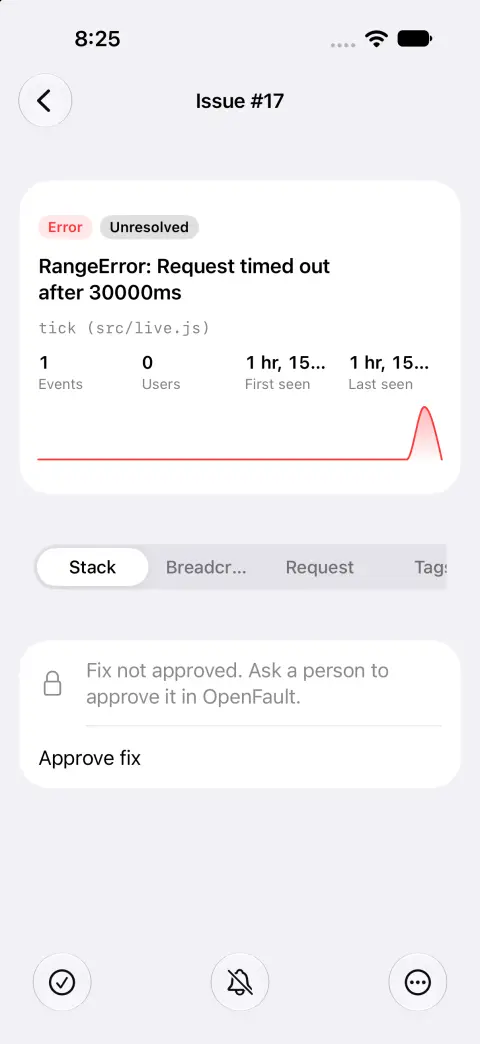
That's the same rule we follow in our own AI-native engineering. The agent does the digging, and a person decides what ships.
Try it
You need an OpenFault server first. The install docs cover it, and it's one docker run. Then install OpenFault from the App Store, pair it, and turn on notifications.
If something breaks, or the app does something you didn't expect, open an issue on GitHub. Reports from real setups are how it gets better.